Let's get started
What is a drone in a box?
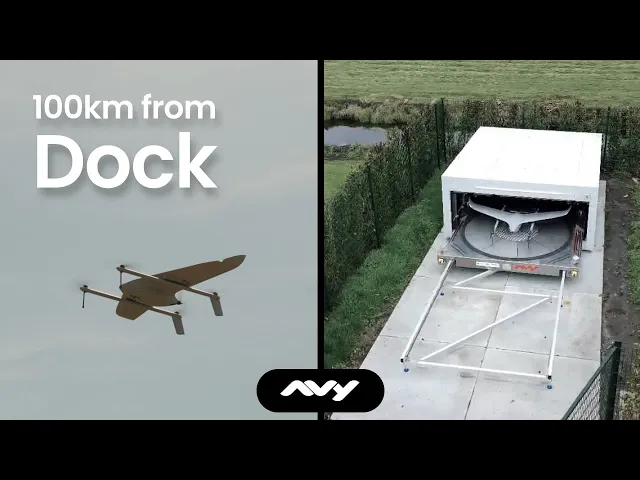
A drone in a box is an aircraft that lives on site inside a weatherproof docking station, launches on command or on a schedule, flies its mission, and returns to the same station to recharge, with no crew on the ground. The drone does not fly inside the box. The box is the station it launches from and returns to.
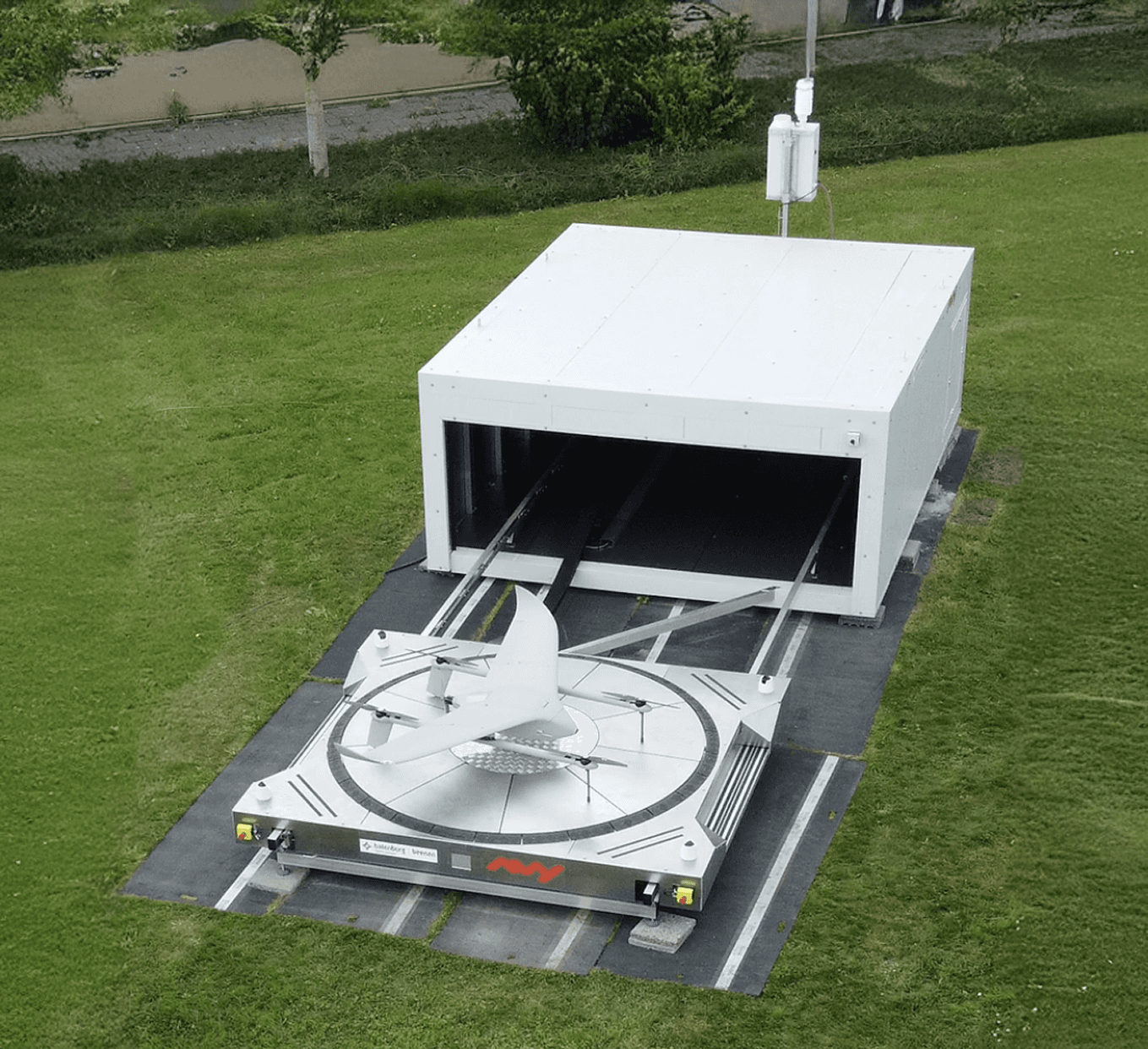
Example Avy Dock
Autonomy is the goal
What it solves
A drone without a docking station needs a human nearby: someone to carry it to the location, set it up, launch it, recover it, recharge it, and do it all again next time. That is not automation. That is a drone with extra steps.
A drone in a box, also known as an autonomous docking station, sits permanently within flying distance of the place you care about. The aircraft launches on command or on schedule, completes its mission, returns, and recharges, with no one on site at any point. The system is always ready.
Docking stations can then be placed to work together as a network, letting an aircraft fly from one dock to the next so a mission covers far more distance than a single flight from a single base.
The difference is easiest to see side by side. A traditional deployment needs a crew for every flight; a drone in a box does the same work without one. Here is how the two compare.
Traditional drone deployment
Drone in a box
Operator required on site
Yes
No
Time to airborne
10–20 minutes
30 seconds
Recurring mission cost
High — crew mobilisation
Low — automated
Scalability
Limited by crew availability
Network of docks
Remote operation
Not possible
Standard
Readiness between missions
Requires recharge and setup
Automatic
A docking station changes what a drone programme can do. Once the aircraft can launch, fly, land and recharge on its own, missions that were too slow, too costly or too dangerous to run by hand become routine. These are the things a drone in a box makes possible.
Protected on site
Between flights the aircraft sits sealed inside the dock, climate controlled and out of the weather. No one has to store it, guard it or bring it back each day.
Rapid response
A docked drone is airborne in 30 seconds. For emergency services, that difference between 30 seconds and 15 minutes is operationally significant.
Scalable networks
Multiple docking stations connected through shared software create a drone network, coordinated coverage across a region, port, or national infrastructure corridor.
Remote operations
A pilot manages missions from hundreds of kilometres away. The dock removes any need for someone to be in the field.
Scheduled operations
Missions run automatically at set times. E.g A port survey every Monday morning, an infrastructure patrol every evening, a detection flight whenever high-risk weather sets in.
Lower cost per flight
With no travel, setup or crew for each mission, the recurring cost of flying drops sharply. The system earns its place on how often you fly, not on a callout every time.
A drone in a box mission cycle
A drone in a box mission follows the same shape whichever system you use, and with an autonomous dock it runs from start to finish without anyone on site.
Trigger
Every mission starts with a reason to fly. It might be a scheduled patrol, an emergency response, or an unplanned flight called for the moment something happens.Plan
The operator sets up a new flight plan or checks a pre-planned one, and confirms conditions are safe to fly, from weather to air traffic in the area.Activate
The dock opens and the aircraft runs its final checks, preparing for the go.Take off
The aircraft launches from the dock.Flight
The aircraft flies its mission, whether an inspection, a surveillance patrol or a response. Throughout, the dock keeps the aircraft and the operator in contact, passing key information both ways.Return
The aircraft heads back and a dock prepares to receive it. This need not be the dock it launched from. It can fly on to another dock further along a route.Landing
The aircraft lands, guided in with precision onto the charger, or brought into alignment by the dock.Secure
The dock closes and secures the aircraft inside. Climate control and locking keep it in the right condition, ready for the next flight.Data
The flight data has been streaming to the operator throughout. With the mission complete, the flight is logged and closed off.
Automation handles the routine. People still decide when to fly, review what comes back, and stay responsible for operating safely and within the rules. A drone in a box removes the crew from the site, not the operator from the loop.
Two systems built around the same drone can behave completely differently in the field, and the differences decide whether a programme runs unattended for years or needs a crew on call. Choosing well means looking past the aircraft to the dock itself: how it lands and charges, how it survives the weather, how it stays connected, and how it keeps itself safe. Each section below covers one of those decisions, starting with the aircraft that goes in the box.
Start with the aircraft, because it sets the limits before the dock does. Three types are commonly built into docks, and the right one depends on whether your mission sits in one place or runs along a distance.
Quadcopter in a box
Quadcopter in a box is the common type. The aircraft takes off vertically, hovers well, and stays close to its station. It suits a fixed site that needs frequent, repeatable flights, for example: a solar farm, a substation, a single small perimeter. Flights are short by design.
Tethered quadcopter in a box
Tethered systems keep a drone aloft on a physical cable, powered continuously from the ground. They give a persistent view of tied to a fixed point for hours, which is their strength and their limit. The aircraft does not travel; it's typically fixed to a boat or a car and provides a better view for that vehicle.
Fixed-wing VTOL in a box
Fixed-wing VTOL in a box, for example the Avy Aera and Dock, launches vertically like a quadcopter and then flies on a wing like an aeroplane. It trades the hover for range, flying far enough on one mission to cover a corridor rather than a point: a stretch of coastline, a length of rail, the run between two sites.
In the case of quadcopter/fixed-wing in a box the drones and docks can be placed along a route so the aircraft flies the distance between them rather than returning to its launch point each time. With a fixed-wing system this can cover enormous areas.
None of these is better in the abstract. If your mission is one site, a quadcopter dock is the sensible answer. If your mission runs along a coastline, a rail line, a pipeline or a border, the range of a fixed-wing aircraft is what covers it.
Every dock has to solve the same two problems: getting the aircraft back onto the pad accurately, and putting energy back into it. How a dock does each shapes how reliable it is and how often it can fly.
For landing, most systems use precision satellite positioning, usually RTK, to guide the aircraft onto the pad to within centimetres. Others use mechanical centring, where arms or a funnel physically push the aircraft into the correct position after a rougher landing. A few use guidance built into the charging method itself, allowing the aircraft to land anywhere within a zone. Precision landing keeps the hardware simple but depends on a good positioning signal; mechanical centring is forgiving of a poor landing but adds moving parts.
For charging, there are four common approaches. Contact charging, where pins or conductive pads on the aircraft meet contacts on the dock, is efficient and simple but needs accurate alignment to connect. Inductive, or wireless, charging transfers power across a small gap, which tolerates dust, moisture and imperfect alignment at the cost of slower transfer. Battery swapping, where a robotic mechanism removes the depleted pack and fits a charged one, sidesteps charging time altogether. Some swapping systems change the payload the same way, so one aircraft can carry different sensors on different flights. And the last is the tethered drone which draws power through its tether which connects to the vehicle power source.
The choice between charging in place and swapping the battery is the single biggest driver of how many missions a dock can fly in a day. Charging a pack in the dock can take 40 to 60 minutes, because lithium batteries can only take charge so fast without shortening their life, which limits a dock to a handful of flights a day. A robotic swap returns the aircraft to the air in a couple of minutes, but does require someone on site. For occasional inspection this makes no difference. For continuous coverage of a site or a corridor, relying on human intervention decides whether the system can do the job at all.
Connectivity
A dock is only autonomous if it can be reached. Connectivity is how the aircraft and dock send telemetry, video to the operator and receive commands. It is often the part that fails first in a remote deployment.
The common links are cellular, either 4G or 5G, wired ethernet or fibre for fixed sites, private cellular networks for closed campuses, satellite for places with no other coverage, and licensed radio. Each trades range, bandwidth, latency and cost differently. Cellular is simple and widely available but depends on local coverage; satellite reaches anywhere but adds latency and cost.
The systems built for serious operation rarely rely on one link. They combine a primary and one or more backups, and switch between them automatically if the primary degrades, so a single dropout does not end a flight. When comparing docks, it is worth asking not just which links are supported but how the system behaves when the best link is lost mid mission.
Positioning is part of connectivity too. Many docks include an onboard RTK base station so the aircraft can land precisely without depending on an external correction signal.
Doors, Security and climate control
The enclosure is the part that decides whether a dock survives a real deployment, because it spends its life outdoors and mostly unattended.
Docks open in different ways. A clamshell splits and folds back to expose the pad. A tray slides the pad out horizontally before the aircraft launches. A roof retracts or lifts to open the top. Each affects how much clear space the dock needs around it and how well it seals when closed. The opening mechanism is also a point of failure to consider, since it operates every flight in all weathers. A clamshell saves space but can be blocked or create a pinch point, a tray requires more space but also more access to the drone as well as larger charging pads.
Weather sealing is measured by an ingress protection, or IP, rating, which describes how well the enclosure keeps out dust and water. Higher ratings matter for docks left in exposed or coastal sites. A rating covers the enclosure when closed; how the dock protects the aircraft while the doors are open, in rain or wind, is a separate and important question.
Climate control keeps the aircraft usable across the temperature range of the site. Passive enclosures rely on insulation alone. Active ones heat, cool and dehumidify, which allows operation in hard frost or high heat and stops condensation forming on the aircraft between flights. Some add snow melting on the roof and filtered air intakes to keep dust out.
Permanence and security vary widely. Some docks are portable and built to be moved between sites as needs change. Others are designed to be fixed in place, anchored and tamper resistant, which suits critical sites where the installation must stay put and stay secure. A fixed, anchored dock also tends to withstand far stronger wind than one that can be picked up and moved.
Hardware gets the aircraft into the air. Software is what a remote operator actually uses, and it varies as much as the docks themselves.
Remote operations software lets a pilot plan, launch, watch and manage missions from anywhere, often through a browser, and increasingly across many docks at once. For an operator running more than one site, the ability to coordinate a network of docks from a single console matters as much as any single dock's specification. Some platforms are tied to one manufacturer's hardware; others work across mixed fleets.
Cameras on the dock, separate from the aircraft's own payload, let operators inspect the station itself, confirm the aircraft is seated correctly, and watch the pad and surroundings. This matters when no one is on site to check by eye.
Airspace awareness is part of the same picture. Many systems bring in ADS-B or radar feeds so a remote operator can see nearby crewed aircraft and know whether it is safe to launch, which is essential once flights go beyond visual line of sight.
An uncrewed system flying without anyone on site has to be able to look after itself when something goes wrong, and the safety design is where a serious system shows itself.
The starting point is what happens when a flight loses something it depends on. A well designed system has a defined response to a lost command link, a low battery, or a lost positioning signal: typically returning to the dock, or landing in a safe place, rather than continuing blind. Redundant command links, as covered above, reduce how often these responses are needed in the first place.
Detect and avoid is how an aircraft keeps clear of others in the air. Approaches range from receiving the signals crewed aircraft broadcast, to onboard radar, optical cameras or acoustic sensors that spot obstacles the operator cannot. The right level depends entirely on the airspace the dock will fly in.
Physical safety features matter too, from emergency stops on the dock to parachutes that let an aircraft come down slowly if it fails in flight. Alongside the hardware sits the regulatory side: whether the system supports the identification and airspace rules of the country it flies in, and whether it can meet the approval needed for beyond visual line of sight operation, which is what allows a dock to fly missions of any real distance without observers on the ground.
Everything above applies to any dock, including ours. This is how we answered those questions for a fixed-wing aircraft.
The Avy Dock is built around Aera, Avy's fixed-wing VTOL drone. From standby she is airborne in 30 seconds. On return, an RTK base station in the dock guides her onto the pad to within centimetres, the door closes and contact pin charging starts automatically. Climate control keeps her within operating temperature from minus 15 to 50 °C, and the enclosure is rated for static wind up to 55 knots. The dock stays connected over dual LTE with a wired Ethernet backup, and a remote pilot runs every mission from the operations centre.
The difference is reach. Carrying a first response camera, Aera has a flight range of 115 km, which gives an operating radius of up to 57 km from a single dock. With a second dock along the route, she can use her full flight range in one direction and land there.
If your mission sits on one site, a multirotor dock is usually the better fit. If it runs along a coastline, a rail line, a pipeline or a border, that is what the Avy Dock was built for.
Port and harbour monitoring
Continuous oversight of quays, approaches and vessel movements across a large site, with a dock covering ground that would otherwise need patrols or fixed cameras with blind spots.
Coastline and maritime surveillance
Regular patrols along a stretch of coast for safety, environmental monitoring or border awareness, where the distance is too great for a drone tied to one point.
Rail and pipeline inspection
Repeatable flights along a corridor to check track, right of way or pipeline for faults and encroachment, flown to the same route each time so changes stand out.
Critical infrastructure security
Scheduled perimeter patrols and on-demand response for sites such as substations, plants and storage facilities, where a docked aircraft is overhead in seconds rather than after a callout.
Emergency response
A first view of an incident before crews arrive, launched the moment an alert comes in, giving responders a live picture of what they are heading into.
Inspection and survey
Routine inspection of assets that are awkward, slow or hazardous to reach on foot, captured consistently on a schedule rather than by an occasional visit.
Did we miss anything?
Here are a few of the frequently asked questions


FAQ
Are you ready?
Avy works with port authorities, terminal operators, and industrial clients across Europe to design drone programmes for survey, inspection, and situational awareness. Comparing docks for a corridor rather than a single site? See how the Avy Dock and Aera work together.